+27 87 073 6525

info@sustainableit.com

Autonomous IT: The Transformation of the IT Department Will Happen Quicker Than You Think

Autonomous IT: The Transformation of the IT Department Will Happen Quicker Than You Think

The traditional IT service desk is dying, and honestly, nobody should really mourn it. For decades, the relationship between employees and corporate technology has been fundamentally reactive. An application crashes, a screen freezes, or a password lock occurs. The employee loses momentum, opens a support ticket, and waits, productivity is lost. This constant disruption creates what industry analysts call digital friction. According to a global study published by TeamViewer in November 2025, this friction costs the average employee 1.3 days of productivity every single month. For an enterprise, that translates directly into missed deadlines, frustrated teams, and clear revenue loss. With that said, a massive paradigm shift is underway. The integration of advanced telemetry, machine learning, and self-healing infrastructure is moving us rapidly toward a new era: Autonomous IT.

From Reactive Repairs to Self-Healing Workspaces

Autonomous IT transforms the technology department from an digital fire department into an invisible orchestrator. Instead of waiting for an employee to complain, autonomous systems work quietly in the background. They monitor device health, analyze software performance telemetry, and resolve anomalies before the user even realizes a problem exists.  Imagine a memory leak silently slowing down a critical analytics tool. In a legacy environment, this triggers a service desk ticket and lengthy troubleshooting. In an Autonomous IT environment, the system detects the anomaly, deploys a background patch, optimization protocol, or micro-reboot, and resolves the issue without interrupting the employee’s train of thought.  In the worst of cases, it may autonomously log a service desk ticket if human intervention is still required.

Why the Shift Will Happen Sooner Than You Think

Many executives view autonomous operations as a futuristic, five-year roadmap item. That is a mistake. The underlying infrastructure required to support this shift is already mature. Solutions in the modern digital employee experience (DEX) landscape, such as TeamViewer’s enterprise platform, are shifting focus away from simple remote desktop troubleshooting, towards proactive, automated endpoint optimization. By leveraging AI insignts, real-time device health diagnostics, and conditional automation scripts, IT teams can manage thousands of distributed endpoints simultaneously and autonomously. TeamViewer in particular is no longer just enabling remote access; they are predicting and preventing tech friction at scale.

The New Role of the IT Leader

Autonomous IT does not make the IT department obsolete. Instead, it elevates it. By offloading routine maintenance and troubleshooting to automated, self-healing solutions, IT professionals are finally freed from firefighting. They can pivot toward strategic digital transformation, security engineering, and designing better human-centric digital experiences.  The transformation to an autonomous model isn’t a distant milestone—it is a competitive necessity unfolding right now and is accelerating through AI adoption. The organizations that adopt proactive, self-healing digital strategies today will capture the productivity dividend, while those relying on reactive ticketing systems will continue to watch precious hours slip through the cracks.

TeamViewer’s Infinity Loop: Turning a Conundrum into Competitive Advantage

TeamViewer’s Infinity Loop: Turning a Conundrum into Competitive Advantage

We have beeen a 1E partner, and now TeamViewer, for over 18 years.  Through that time we have seen the market shift  and technology evolve, particularly in the end user computing space which is our main focus.  There was much excitement when TeamViewer announced the acquisition of 1E.  For us there was an acknowledgement that being in the stable of a brand that the market recognised and was widely known, could only be beneficial to the traditional 1E business.  However, there was a nagging doubt, which almost bordered on comical.  For years, 1E had banged on the drum that you shouldn't have to remote into devices as it impacts the end user and wastes time.  This was at the core of their value proposition, an incredible automation engine that fixes things before they break, why remote, it is antiquated? And as we know, TeamViewer is known as the remote company, we have all used it over the years, in many forms, including fixing mom's laptop in Covid times.  We sensed a conundrum, how were these diametrically opposed solutions, at face value, going to come together into a single cohesive solution?

What is emerging is one of the most compelling value propositions in the market today, a solution that at its core, continually and infinitely transforms the way end user computing services should be delivered.  We needn't have worried.

Navigating the Conundrum

Traditionally, the narrative around remote support had been a double-edged sword. While indispensable for troubleshooting, reliance on remote tools can inadvertently lead to a perception of dependency, intrusion and a lack of speed, contradicting the traditional messaging of 1E, which championed eliminating the need for such tooling. And herein lies the genius of TeamViewer's approach: rather than viewing remote support and DEX as mutually exclusive, the Infinity Loop integrates them into a symbiotic relationship which places them in a unique position in the market.  In our opinion, nobody can touch them.

Industry Standards and TeamViewer's Unique Approach

In the realm of end-user computing, industry standards often gravitate towards specialized solutions—either focusing on robust remote support or advanced digital experience management. Many competitors excel in one domain while compromising on the other. This fragmented approach can lead to inefficiencies, where the lack of integration between remote support and DEX insights results in prolonged downtimes and user dissatisfaction.

Remote Support vs. DEX:

  • Traditional Remote Tools: These often prioritize immediate problem-solving but lack proactive capabilities. They are reactive by design, addressing issues only after they arise, which can lead to repetitive interventions and increased dependency.
  • DEX-focused Platforms: While these platforms excel in user experience management and predictive analytics, they sometimes fall short in providing comprehensive support solutions, especially for complex technical issues that require expert intervention.

TeamViewer's Competitive Edge

TeamViewer stands out by bridging this gap through its Infinity Loop. By integrating AI-driven remote support with real-time DEX insights, TeamViewer not only resolves current issues but also anticipates future problems. This dual capability ensures a seamless user experience that competitors often struggle to offer.

  • Proactive Problem Solving: TeamViewer's real-time data analytics and AI-driven insights allow it to predict and resolve issues before they impact the user, a capability often missing in traditional remote tools.
  • Holistic User Experience: By combining remote access with DEX insights, TeamViewer ensures a holistic approach that enhances productivity and satisfaction, aligning with both IT objectives and end-user needs.

In essence, while competitors may offer excellence in isolated aspects, TeamViewer's integrated approach ensures comprehensive service delivery. This not only sets a new standard but also redefines expectations in the end-user computing market.

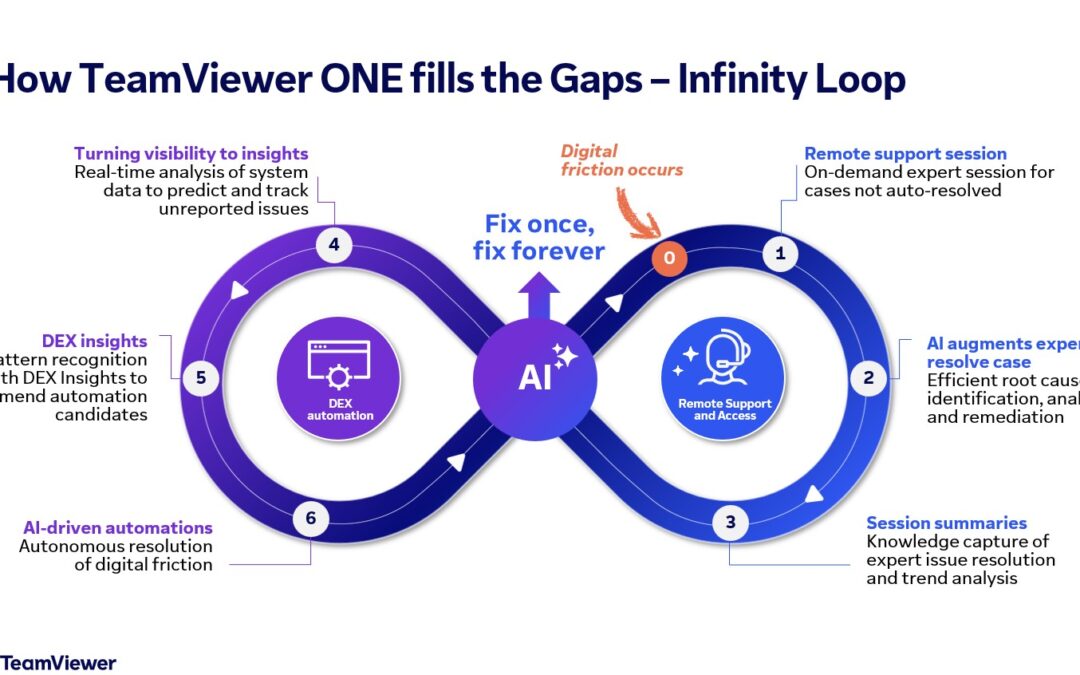
The Infinity Loop: The quest for zero defect

So how does this all come together?

1. Remote Support Session: TeamViewer’s platform begins with on-demand expert sessions tailored for cases that resist auto-resolution or are "new" issues within an environment. This foundational step ensures that no problem is too remote to address, literally and figuratively.

2. AI Augmentation: AI plays a pivotal role, enhancing an expert's ability to identify root causes swiftly and accurately during this remote session. The AI-driven augmentation ensures that the expert's interventions are precise, impactful and timeous.

3. Session Summaries: The loop captures knowledge with detailed session summaries, facilitating trend analysis and enhancing future interventions. This creates a repository of insights, turning every session into a learning opportunity.  TeamViewer is actively harnessing AI to suck knowledge out of engineers, without them even realising it.

4. Visibility to Insights: Real-time system data analysis is key. TeamViewer transforms visibility into actionable insights, predicting and tracking issues before they escalate into disruptions.

5. DEX Insights: Pattern recognition within the DEX framework identifies automation candidates, optimizing processes and minimizing friction before it even occurs.

6. AI-driven Automations: Autonomous resolutions are where the loop closes. Learning opportunities and insights identified in step 3 are transformed into proactive automations deployed across the remainder of the estate, allowing digital frictions to be resolved without human intervention. This not only saves time but also empowers end-users with a smooth, uninterrupted experiences.

Competitive Edge

In a market teeming with alternatives, the holistic nature of TeamViewer One's approach sets it apart. By seamlessly integrating remote support with proactive DEX strategies, TeamViewer not only addresses immediate issues but anticipates future needs and prevents repetitive disruption. Competitors often offer either robust remote solutions or advanced DEX capabilities, but never both in such a cohesive manner.

The result is a platform that doesn't just react to problems but actively prevents them, enhancing overall productivity and satisfaction. This strategic positioning transforms the conumdrum into a distinct competitive advantage.

Conclusion

The Infinity Loop is more than a process; it is a paradigm shift in how service delivery is perceived and executed. By converting the remote support conundrum into an opportunity for innovation, TeamViewer has positioned itself uniquely in the end-user computing market. The integrated capabilities of remote support and DEX insights within the TeamViewer One Platform not only resolve existing challenges but also redefine the possibilities for future service delivery.

In essence, the TeamViewer Infinity Loop exemplifies how turning a conundrum into a competitive advantage isn’t just a strategic move—it’s a transformative vision for the future of end-user computing.

Reducing service desk tickets with TeamViewer DEX

Reducing service desk tickets with TeamViewer DEX

Anyone who’s worked on a service desk knows that a large percentage of tickets aren’t complex — they’re repetitive. Slow laptops, applications that won’t launch, VPNs dropping, or devices running out of disk space. Users usually raise a ticket once the issue has already interrupted their work, which means IT is always reacting.

TeamViewer DEX helps change that dynamic by giving IT teams real-time visibility into endpoint health and user experience. It continuously collects telemetry from devices, looking at things like CPU and memory usage, disk capacity, application crashes, boot times, and policy compliance. When something starts to drift outside of normal thresholds, DEX flags it early.

The real win for ticket deflection comes from automation and self-healing. For example, if a device is consistently running low on disk space, DEX can trigger a cleanup script before performance degrades. If a key business application crashes repeatedly, IT can automatically restart the service, reset user profiles, or push a known-good configuration. In many cases, the user never notices there was an issue at all — and no ticket is logged.

DEX also helps surface trends across the environment. If an OS update causes longer boot times or a VPN client update introduces instability, IT can spot the pattern quickly instead of piecing it together from dozens of tickets. Fixing the root cause once is far more effective than handling each incident individually.

By feeding these insights into self-service tools, dashboards, or proactive user communications, organisations can guide users to quick fixes or avoid issues altogether. The result is fewer tickets hitting the service desk, faster resolution when issues do occur, and a more proactive, data-driven approach to endpoint support.

Microsoft Ecosystem vs TeamViewer DEX Platform: A Comparative Analysis

Microsoft Ecosystem vs TeamViewer DEX Platform: A Comparative Analysis

Digital transformation has fundamentally changed how businesses operate, placing a greater emphasis than ever before on the quality of digital employee experiences. With endpoints becoming critical to daily productivity, it is essential to assess how well platforms like Microsoft and TeamViewer DEX support these experiences. This comparative analysis examines their capabilities and impact in detail.

Executive Summary: Digital Employee Experience (DEX) directly impacts productivity, user satisfaction, and business performance. The Microsoft ecosystem provides a solid foundation for managing endpoints at scale, covering scheduled automation, compliance, and baseline analytics. TeamViewer DEX platform significantly enhances this foundation, offering advanced real-time remediation, proactive incident handling, and comprehensive user-centric analytics, making it superior in reducing digital friction and improving the employee experience.


A full comparative analysis is available for download here


Comparative Capability Scorecard

Article content
Scores presented in this table are based on a detailed qualitative evaluation of these two platform's capabilities. The scoring is subjective and intended as a high-level guideline rather than an absolute measurement.


Key Area Highlights

1. Endpoint Automation

  • Microsoft: Effective for large-scale scheduled tasks, software deployments, updates via Intune and Autopatch. Cadence is periodic, typically daily.
  • TeamViewer DEX: Real-time remediation and continuous monitoring. Instantly corrects compliance drift, autonomously heals critical issues in seconds.

2. Endpoint Experience & Analytics

  • Microsoft: Provides basic telemetry on boot performance, app crashes, and basic reliability. Metrics updated daily, lacks direct user feedback integration.
  • TeamViewer DEX: Detailed real-time analytics including stability, responsiveness, resource performance, and user sentiment. Comprehensive Experience Score updated continuously, allowing proactive interventions.

3. Device Refresh & Lifecycle Management

  • Microsoft: Provides basic insights into device health and battery status, but lacks proactive refresh recommendations.
  • TeamViewer DEX: Offers actionable, real-time device lifecycle management (Retain, Repair, Refresh, Replace). Integrates vendor warranty data, significantly optimizing refresh cycles and reducing unnecessary hardware costs.

4. Inventory Management

  • Microsoft: Improved hardware and software inventory accuracy with daily updates. Good foundational inventory data, though lacks real-time accuracy.
  • TeamViewer DEX: Real-time inventory updates, software normalization, complete visibility of hardware and software changes immediately. Ensures hyper-accurate CMDB integration.

5. Real-Time Troubleshooting

  • Microsoft: Limited live diagnostics, reliant on scheduled data collection or manual intervention. Troubleshooting tools (Intune, Remote Help) require user interaction.
  • TeamViewer DEX: Immediate, interactive endpoint diagnostics and remediation at scale. Rapidly diagnoses and resolves issues in real-time without user disruption.

6. ITSM Integration

  • Microsoft: Basic CMDB synchronization with ServiceNow, limited automation capabilities. Primarily manual and uni-directional data flow.
  • TeamViewer DEX: Advanced integration with ServiceNow. Real-time data and actions directly accessible within ServiceNow tickets, automated incident handling, chatbot-driven self-service support.

7. Other DEX Capabilities (Self-Healing, Self-Service, Sentiment)

  • Microsoft: Limited autonomous remediation, minimal self-service capabilities, no built-in user sentiment measurement.
  • TeamViewer DEX: Robust self-healing, proactive guidance, integrated user sentiment analysis, and advanced self-service capabilities through chatbots and user portals.

Real-World Example:

An endpoint experiencing critical service stoppage typically requires hours of wait-time within Microsoft's ecosystem. Conversely, TeamViewer DEX detects and remediates this issue automatically within seconds, significantly reducing downtime and improving the user experience.


Final Verdict:

For organizations prioritizing Digital Employee Experience, integrating TeamViewer DEX with the Microsoft ecosystem provides the most comprehensive, proactive, and effective endpoint management strategy. While Microsoft forms a reliable baseline for endpoint management, TeamViewer DEX excels in delivering superior real-time remediation, deeper user-centric insights, and a genuinely proactive approach to digital experience management.

Reclaim is actually the “killer-app”

Reclaim is actually the “killer-app”

I recall a conversation many years ago with Sumir Karayi, the then CEO of 1E.  AppClarity, 1E’s SAM solution had just been released and we were chatting around what I thought of the product.  In that conversation I recall telling Sumir that I thought AppClarity was the killer app, on reflection, I think I may have been mistaken, it was a particular component of the solution that made it so compelling.

Software is so prevalent in our everyday lives that we come into contact with it almost continuously, be it the mobile phone you are using, the smart TV you are watching, the smart appliance you are interacting with or the desktop or laptop you are using to perform your job function.  Software is basically everywhere.

Software is also very accessible.  The internet brought with it digital freedom and the software vendors have used this digital freedom to entice people to use their software through easily available downloads, whether “free” or not.  In a not dissimilar way, this concept has been replicated behind the corporate firewall where vendors have signed enterprise agreements that allow organisation the ubiquitous use of their software across almost every device.  If you install it you pay for it.  Be this on premises or cloud base, whether used or not, software vendors are enticing your users to get their software, ultimately it is how they make their money.

With so much software out there, with so many vendors, titles, versions, cloud/non cloud etc, managing this environment has become ever more challenging, despite the undisputed value that the majority of software brings to organizations.  However, with greater freedom, definitely comes the requirement for greater control.  Software sprawl or software bloat is an ever-increasing problem and many organizations pay licensing for software that is not actually being used or providing little to no business value.  This is untapped cost savings for most organizations.

Going back to my conversation with Sumir, the killer app was actually what 1E refer to as Software Reclaim.  This is an engine that identifies software versioning, surfaces the usage of software and using a policy-based approach, allows organizations to dynamically uninstall software that is not being used.  You can do this with either an interactive pop up or a silent install behind the scenes with zero impact to the end user, pretty cool tech to be fair.

Research in the past indicated that as much as 38% of software in an organization is unused or rarely used and despite the onset of many cloud solutions, I don’t think this needle has moved significantly.

Software Reclaim is still the killer app and now part of 1E’s enterprise platform.  If there is ever a product feature that is a no brainer and provides instant ROI, this is it.

Harnessing the Power of Device Refresh: A Sustainable Approach to Corporate Computing

Harnessing the Power of Device Refresh: A Sustainable Approach to Corporate Computing

In the dynamic landscape of technology, where innovation is constant and upgrades are frequent, the concept of prolonging the lifespan of personal computers, has emerged as a sustainable alternative with multifaceted benefits.  This strategy goes beyond mere frugality; it’s a strategy that aligns with environmental consciousness, optimizes resource allocation, and enhances end user experience. Let’s delve into the diverse advantages of embracing this approach.

Reducing Hardware Costs and cost deferrals

In the business realm, keeping up with the latest hardware can be financially taxing. However, sweating PCs offers a cost-effective solution. By extending the life cycle of existing devices, organizations can significantly reduce expenditure on frequent hardware upgrades. This reallocation of funds can be redirected towards innovation, employee training, or other essential aspects of the business, fostering sustainability and financial stability simultaneously.

Minimizing Carbon Footprint

The environmental implications of technology consumption are undeniable. From manufacturing processes to disposal, every stage of a device’s life cycle contributes to its carbon footprint. By prolonging the operational lifespan of PC’s, we can effectively reduce the demand for new hardware, consequently curbing the environmental impact associated with manufacturing and disposal. This shift towards sustainability aligns with corporate social responsibility goals and contributes to a greener future.

Enhancing Device Health

Constantly upgrading hardware may seem synonymous with optimal performance, but it often overlooks the importance of device health. Over time, PC’s accumulate software bloat, inefficiencies, and wear and tear that can degrade performance. Merely through implementing efficient maintenance protocols, such as regular software updates and hardware performance monitoring, organizations can prolong the operational lifespan of their devices while ensuring consistent performance. This proactive approach not only saves replacement costs but also enhances productivity by minimizing downtime caused by hardware failures.

Informed Decision-Making with Data

In the era of big data, informed decision-making is paramount for organizational success. Having the correct tooling in this respect such as 1E for Device Refresh facilitates data-driven insights into device usage patterns, performance metrics, and user behavior. By leveraging analytics tools like this, organizations can gain valuable insights into when to refresh devices, which hardware components require upgrades, and how to optimize resource allocation based on user needs. This data-driven approach empowers organizations to make strategic decisions that maximize efficiency and productivity while minimizing costs.

Tailoring Devices to User Needs through Personas

Every user has unique computing requirements, preferences, and workflows. Organizations must tailor devices to match user needs effectively. By leveraging personas—fictional representations of user demographics, behaviors, and goals—organizations can identify specific hardware configurations, software applications, and peripherals that enhance user experience and productivity. This personalized approach not only improves user satisfaction but also optimizes resource utilization by investing in technologies that align with actual user requirements.  It also allows the reallocation of devices that are still for for purpose to users that may require them

In conclusion, extending the useful life of assets represents a paradigm shift towards sustainability, efficiency, and user-centricity in computing. By extending the lifespan of personal computers, organizations can reap multifaceted benefits ranging from cost savings and environmental stewardship to enhanced device health and user satisfaction. Embracing this approach not only aligns with the principles of corporate social responsibility but also fosters a culture of innovation and informed decision-making in the ever-evolving landscape of technology. The bottom line, this results in significant savings and ticks off sustainability at the same time!